Managing sources in models
A source is a system that contributes data to or accepts updates from master data domains hosted in repositories. You use sources to define how systems exchange data with these domains. Adding sources to your model helps you maintain consistent domain source configurations across repositories.
Most sources both contribute data and accept updates. However, some sources support only one direction. For example, data warehouses typically do not contribute data, while spreadsheets and web forms typically contribute data but do not accept updates.
Embedded sources
You can deploy a version of a model with embedded sources to a repository. Embedded sources are sources defined in the model and are automatically attached to the domain when you deploy the model. If you deploy another version of that model, the domain's source attachments are updated according to the new model's source configuration.
If you deploy a subsequent version without embedded sources, all sources attached to the domain are removed. If you want to reattach sources, you either need to manually reattach the sources from the domain’s Sources tab or deploy a new or previous version with embedded sources.
Add sources to a deployed model
If you want to add sources to a previously deployed model, you can import the domain source configuration into the model. This allows the model’s source configuration to initially reflect the domain's current source configuration.
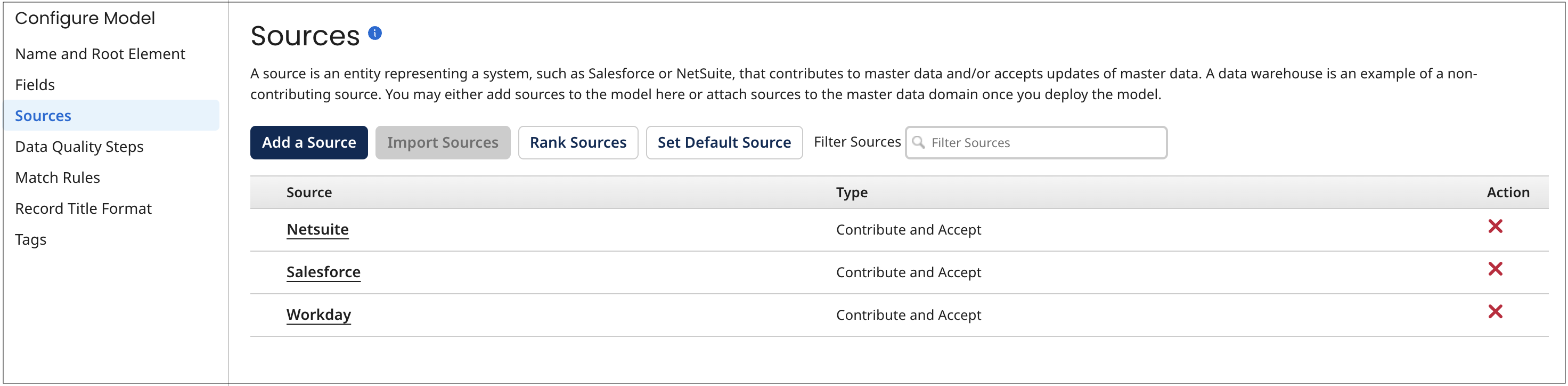
Select the Sources tab in a model page to add and import sources to the model, modify the model’s sources, and remove sources from the model. Optionally, you can rank the model’s sources and set the model’s default source in the Sources tab.
When you hover over a source's name, a unique source ID is displayed for use in integrations and REST API calls. If a source is designated as the model's default source, “ - Default” appears immediately after its name in the summary list, indicating the primary source.
Configure source rankings
When you deploy a model with embedded sources to a repository, the repository incorporates contributed entity data into the master data domain on a first-come, first-served basis, regardless of source trustworthiness. This approach introduces two risks, which increase as additional contributing sources are attached to the domain.
- Master data can be updated with data from less trusted sources.
- As a result, less trusted data may be propagated to source systems through update requests.
You can mitigate these risks through source ranking, and effectively eliminate them by assigning appropriate source priorities.
Example: Ranking sources across systems
Consider a domain containing master data contributed from three source systems — financial, operational, and marketing. Typically, an entity is first added to the marketing system, later added to the operational system, and added last to the financial system. The source of record for a given golden record is the system to which the entity was most recently added.
To automate governance of golden record updates and propagation of update requests to support this hierarchy, rank the domain model's sources as follows:
-
financial
-
operational
-
marketing
When the model is deployed, these rankings ensure the following for contributed entity data:
-
Less trusted data from the marketing system does not update golden record data sourced from the operational or financial systems.
-
Less trusted data from the operational system does not update golden record data sourced from the financial system.
In both cases, the system rejects less trusted data and, if available, propagates more trusted golden record data to contributing sources through update requests.
Apply rankings at field and field group levels
You can apply source rankings at the field and field group levels to support scenarios where the source of record varies based on data element.
- A field is a single data attribute, such as Address or Account Executive.
- A field group is a set of related fields that you manage together, such as an Address group containing street, city, state, and postal code.
For example, a domain may use the financial system as the primary source of record, with exceptions:
- The operational system is the source of record for the Address field group.
- The marketing system is the source of record for the Account Executive field.
In the Golden Records page, you can view each field’s values across sources and see which source supplies the selected golden record value when rankings are applied.
Manage source rankings
You can enable, change, or disable source rankings for fields or field groups at any time.
When you enable rankings in a model or assign a different highest-ranked source for a field(s) or field group(s), deploy the model and ensure that the highest-ranked sources immediately contribute their current values. These contributions determine the golden record values for the fields and field groups where the source is highest ranked. Each source should contribute only the fields and field groups for which it is highest ranked.
When you add a source, the system automatically assigns it the lowest rank for all fields and field groups with configured rankings. If this default ranking does not meet your requirements, update the rankings for the affected fields or field groups as soon as possible.
Do not rank sources for fields that use data quality steps. Data quality processes determine the final golden record values for those fields, so source ranking does not apply.
When you deploy a model with embedded sources and source rankings to a repository, the system applies the source rankings to the domain, which determines how golden record values are selected. If you deploy a subsequent version, the system updates the domain’s source rankings to match the new model version.
If you deploy a subsequent version without embedded sources or source rankings, the system removes all source rankings from the domain.
Configure inbound contributions
When you embed a source in a model and deploy it to a repository, you can configure how that source contributes data to the master data domain. These settings control how incoming data affects golden records.
Configure links and field contributions per source
You can allow a single golden record to link to multiple records from the same source system. Use this option when the source system cannot identify or remove duplicate records. This setting affects both inbound contributions and outbound deliveries. For inbound contributions, enabling multiple links allows records that would otherwise be quarantined as potential duplicates during batch processing to be incorporated into the domain.
You can configure a source to conditionally or unconditionally exclude specific fields or collections from create and update operations on golden records. Use this option for sources that are not the source of record for those fields. If your match rules exclude certain fields, mark those fields as Required in the model. This ensures data stewards review and maintain values that are not used for matching and may not be reliably updated through source contributions.
Do not exclude a field from all sources when using source rankings. At least one source must contribute the field so the system can apply rankings to determine the golden record value.
Require manual approval for contributions
You can require manual approval before the system incorporates a source’s entity contributions into golden records. You can apply approval requirements in the following scenarios:
-
New entity contributions. Require approval (conditionally or unconditionally) before creating new golden records. Use this option for sources that are not the source of record at the record or field level.
-
Updates to existing golden records. Require approval when a contribution updates any or selected fields in a matching golden record. You can apply this at the record level or field level. Alternatively, you can use source rankings (if enabled) to control updates without requiring manual review.
-
Pending links with base values. When a matching golden record has a pending link and a field contains a base value:
- If approval is required, the system waits for review before applying the update.
- If approval is not required, the system creates the link, but does not update fields that already have base values.
noteA field’s base value for a source is the value stored in the matching golden record at the time the link to that source was established. While a link is pending, the system uses the golden record version that existed when the link was created as a fixed reference point (the base version).
-
You can require approval when a source contribution end-dates a matching golden record linked to that source.
Contributions that require manual approval are quarantined until they are reviewed and approved.
You can change a source’s inbound contribution settings at any time, but changes take effect after model deployment.
Configure outbound deliveries
When you embed a source in a model and deploy it to a repository, you can configure how the system sends source record update requests from the master data domain to the source system through the source’s channel.
Full and differential update types
You can configure a source to send either full updates or differential updates when propagating changes to the source system.
- Full updates include all fields from the golden record.
- Differential updates include only the fields whose values have changed.
Use differential updates when the source system can identify records by ID and apply partial updates. Differential updates also reduce bandwidth compared to full updates. Some systems, however, require full updates because they overwrite all fields during an update.
Allow multiple record links per source
You can allow a single golden record to link to multiple records from the same source system. Use this option when the source system cannot identify or remove duplicate records.
This setting affects both inbound contributions and outbound deliveries. For inbound contributions, enabling multiple links allows multiple records from the same source to link to a single golden record, instead of being quarantined as duplicates. For outbound deliveries, when a golden record is updated, the system sends an update request for each linked source record on the source’s channel.
Control update propagation
To support data compliance:
- You can control how the system propagates update requests from golden records to a source system.
- Allow – Always propagate update requests.
- Conditionally allow – Send update requests only when specified conditions are met.
- Conditionally disallow – Block update requests when specified conditions are met.
You define conditions based on the operation type (create, update, or delete) and tags applied to golden records. (A tag is a component of a model that specifies a rule for tagging golden records based on their data — for example, the tag Customer for golden records with the Type field value of “Cust”.)
-
Send all requests (create, update, and delete) only for golden records with selected tags.
-
Send only create requests for golden records with selected tags.
-
Disallow all create requests.
-
You can also exclude specific fields or collections from update requests sent to the source system.
You can modify a source’s outbound delivery settings at any time, but the changes take effect only after you deploy the model.
Set default source
In master data management, organizations often store reference data (such as geographic locations) in separate domains from core business entities (such as customers or products). This approach helps maintain consistent references across domains and source systems. To identify a reference data model, designate one of its sources as the default source.
When you deploy the model as a reference data domain, the default source controls how references are resolved. If a source that is not connected to the reference data domain sends a reference, the system uses the default source to match the reference ID to a golden record in the reference data domain.
When you deploy a model with embedded sources and a default source to a repository, the system applies the default source to the domain. If you deploy a new version of the model, the system updates the domain’s default source to match the new version.
If you deploy a version without embedded sources or a default source, the system removes the default source designation from the domain.
Example: Supporting multiple employee roles
A company tracks employees in multiple systems. One employee, Jane, works two roles: Manager and Trainer, each with a different staff number.
Initially, the model allows only one staff number, so when a new role is added, it replaces the existing one.
To support multiple roles at the same time, the Staff Number field is changed to a repeatable field (collection). This allows the golden record to store both roles and append new ones instead of overwriting existing data.
