Overview
Add an identity provider (IdP) to a tenant to provide external user authentication for your flows.
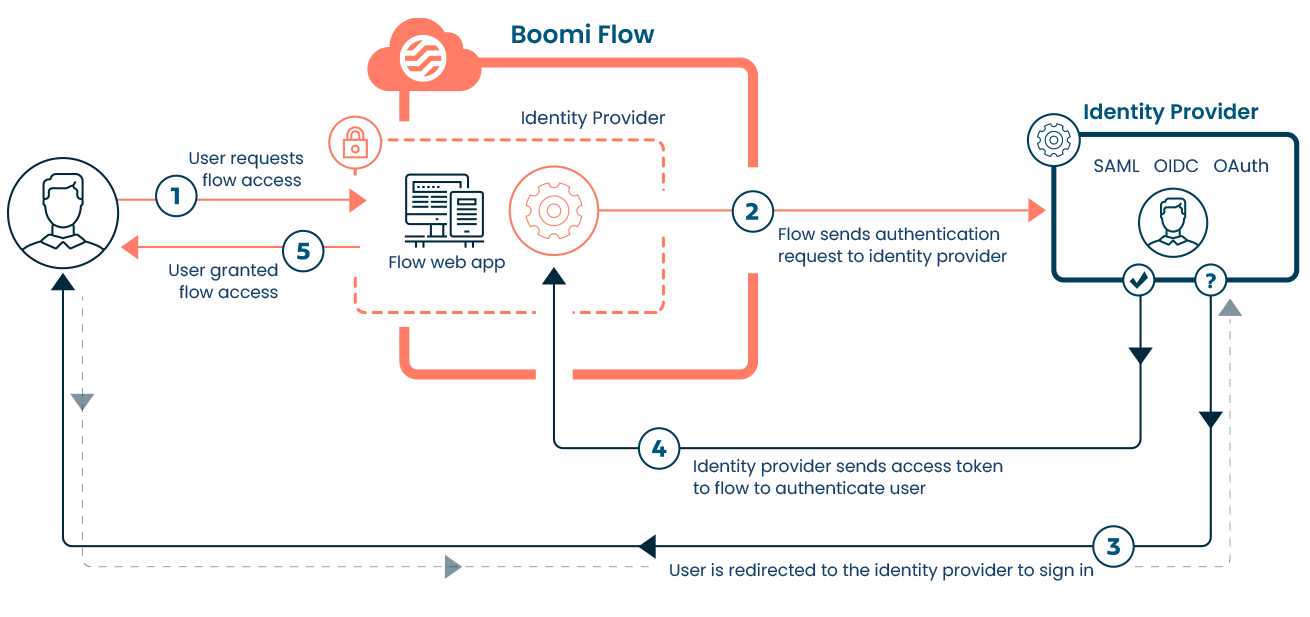
Adding an identity provider (IdP) to a tenant allows for external user authentication for your flows. This enables the delegation of flow user authentication to an external IdP service, facilitating Single Sign-On (SSO) capabilities. Users can access the flow only after successfully signing in to the IdP using their existing social or enterprise accounts.
When Enhanced Token Security is enabled, an encrypted one-time-use token is provided to the flow runtime UI as part of a redirect-based authentication scheme. This token is then exchanged securely with the flow API to complete the authentication process.
To add and configure an identity provider, navigate to Identity Providers page. You can use this identity provider to control access to an entire flow, or to specific sections of a flow by using swimlanes. This is accomplished by adding the required groups or users to the Authentication section on the Flow Properties form or a swimlane step.
State locking
When using an Identity Provider to authenticate users in a Flow, you can enforce state locking to enhance access control and security. By default, an Identity Provider verifies a user's identity, but multiple users with valid credentials could theoretically access a shared flow state if they possess the State ID. State locking ensures that when an authenticated user initializes a Flow, the resulting state is strictly locked to their unique identity.
- Behavior: If a state is locked to a specific authenticated user, no other authenticated user can access or modify it, even if they have the correct URL or State ID.
- Subflows: The locking behavior extends to Subflows, ensuring the security context persists across authentication context changes.
Supported Identity providers
The following identity provider frameworks and protocols are supported:
-
Open Authorization (OAuth) 2.0. See Adding an OAuth 2.0 identity provider.
-
OpenID Connect (OIDC). See Adding an OIDC identity provider.
-
Security Assertion Markup Language (SAML). See Adding a SAML identity provider.
Session and token expiration
The expiration of the Flow runtime authentication token is synchronized with the Identity Provider (IdP) settings to ensure consistent security policies.
- OIDC / OAuth2: The Flow token expiry directly inherits the expiration timestamp provided in the Access Token returned by the IdP.
- SAML: The Flow token expiry is determined by the Active Session Timeout value configured in the Flow/Tenant settings (calculated as Now + Configured Timeout).
Worked examples
To help you get started with using an identity provider to provide flow authentication, the following worked examples are provided:
