Oracle CDC overview
Data Integration uses the capabilities of Oracle LogMiner to establish a robust and effective Change Data Capture (CDC) feature for Oracle databases. Our internally developed solution maximizes the potential of Oracle LogMiner, ensuring a dependable and precise method for capturing and handling alterations within the Oracle database. By capturing table inserts, updates, and deletes, CDC enables applications to efficiently use real-time data changes.
Oracle Change Data Capture (CDC)
Change Data Capture (CDC) is a feature in Oracle Database that identifies and captures data changes in tables. Instead of querying the entire table to check for modifications, CDC enables you to extract only the changed data, reducing resource usage and improving application performance.
Benefits of CDC
- Real-time data integration: CDC provides the immediate capture and propagation of data changes, enabling real-time data warehousing and analytics.
- Reduced load on the source database: By capturing only the changes, CDC minimizes the impact on the source database, improving system performance.
- Reliable data synchronization: CDC ensures that the target system receives a consistent and accurate representation of data changes.
Working with CDC
The Data Integration CDC solution operates by continuously observing the database's Redo-log, which maintains a comprehensive history of all data modifications. Once a transaction is confirmed, the database produces corresponding redo log entries to record every specific change. Using the LogMiner interface, we extract information from Redo-logs. Oracle manages these archived logs, which effectively record and store the changes made to the data.
CDC Point in Time position feature
The CDC Point in Time Position feature provides deeper insights into the operational details of a River's streaming process. This feature is essential for data recovery and synchronization, enabling you to locate and retrieve data from a specific point in history using the exact information stored in the CDC log position. For more information, refer to CDC Point in Time position topic.
A 'Sequence' CDC deployment
Discrepancies in transaction records can occur when two users simultaneously execute identical transactions, resulting in conflicts in the timestamp field. Data Integration implemented a sequence Change Data Capture (CDC) mechanism to tackle this issue.
Data Integration has enhanced each emitted record from the database by incorporating two extra metadata fields: '__transaction_id' and '__transaction_order'.
-
The '__transaction_id' field serves as a unique identifier for each transaction, ensuring no two transactions share the same identifier. This uniqueness enables precise identification and differentiation between transactions, thereby mitigating conflicts that arise from identical timestamps.
-
The '__transaction_order' field denotes the order in which the transactions were emitted from the database. By incorporating this field, the sequencing of transactions can be accurately maintained, enabling downstream systems such as Apache Kafka or AWS Kinesis to process and order transactions correctly.
The inclusion of these metadata fields guarantees that the ordering of transactions is preserved throughout the River. As a result, smooth and accurate transaction flows can be achieved, resolving the discrepancies that previously arose from transactions with identical timestamps.
The additional fields are depicted in this table:
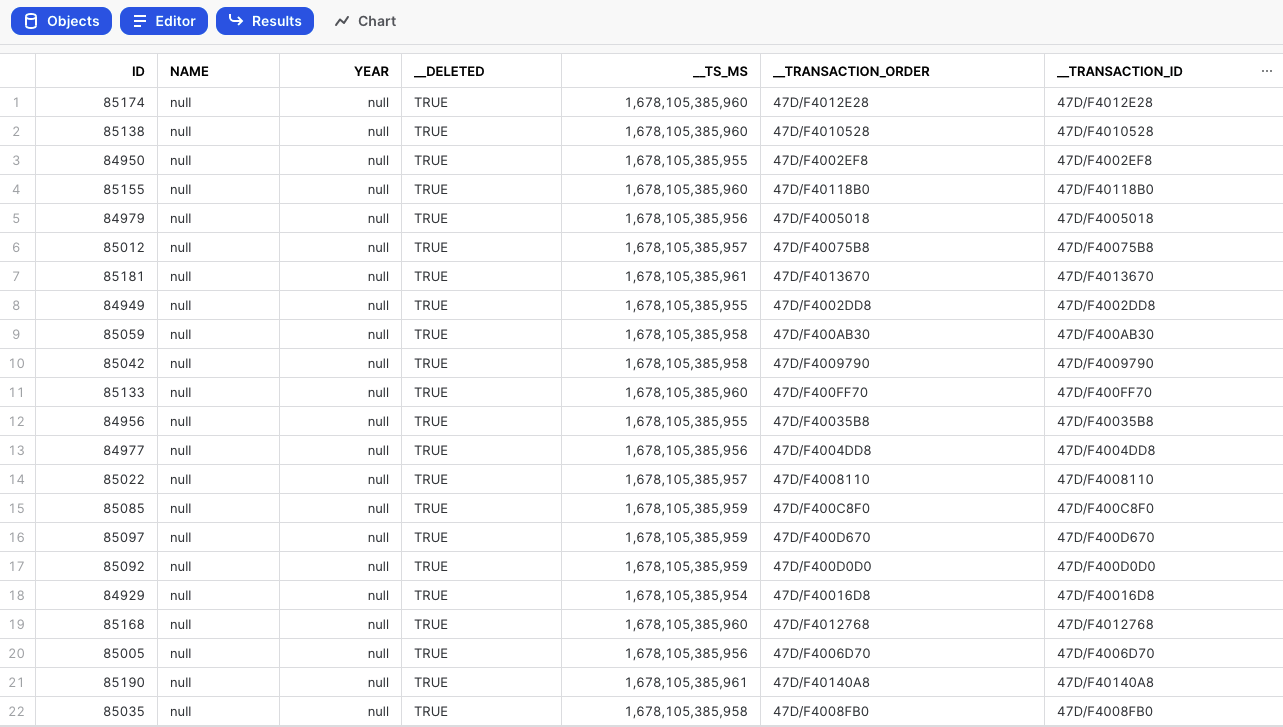
For further details about Change Data Capture (CDC) Metadata Fields, refer to our Database Overview document.
Oracle CDB and PDB in integration with CDC
In the context of real-time Integration with Change Data Capture (CDC), Oracle's Container Database (CDB) and Pluggable Database (PDB) architecture plays a crucial role.
Oracle CDB-PDB architecture
Container Database (CDB)
The Container Database serves as the root container, holding multiple Pluggable Databases. It provides a centralized and shared infrastructure for managing and maintaining database resources. In the context of real-time data integration, the CDB provides efficient resource utilization and a unified approach to Change Data Capture.
Pluggable Database (PDB)
Pluggable Databases are available within the Container Database and operate as separate, fully functional databases. Each PDB has its own data dictionary, table spaces, and schema, enabling a multi-tenant architecture. Real-time integration with CDC leverages the isolation and independence of Pluggable Databases (PDBs) to capture and process changes at a granular level.
Integration with Change Data Capture (CDC)
The CDB-PDB architecture is well-suited for CDC scenarios. Each PDB can independently enable Change Data Capture based on its specific requirements. With multiple PDBs operating independently, the CDB-PDB architecture provides scalability in capturing and processing changes, making it suitable for large-scale integration scenarios.
CDC setup in Oracle CDB-PDB
Within Oracle's multi-tenant architecture, when managing redo logs within a Pluggable Database (PDB) setting, a user with administrative privileges designated as 'sys' with the role 'sysdba' is required to establish a new user for Data Integration applications. This user should have the capability to use the LogMiner API for redo log operations on Pluggable Databases (PDBs), as employed by Data Integration for streaming changes.
To get guidance on setting up, review the Oracle CDC Configuration topic. For more information about Container Databases (CDBs) and Pluggable Databases (PDBs), refer to Oracle's documentation.
Working with Oracle CDC in Data Integration
Data Integration integrates seamlessly with Oracle CDC by leveraging CDC capabilities provided by Oracle Database. Data Integration CDC integration enables you to set up data replication tasks that capture and propagate real-time changes from Oracle Database to their desired data Targets.
You can set up Oracle CDC in Data Integration.
Procedure
- Oracle CDC Configuration: To use this feature, you must activate the Archivelog mode in your Oracle Database. Activating this mode is essential for the effective operation of the CDC mechanism, as it guarantees the preservation and retrieval of all data changes.
- Connect to Oracle Database: Establish a connection between Data Integration and the Oracle Database containing the source data.
- Enable CDC: Within the following console tour on using Oracle CDC extraction mode, you are guided through the process of:
- Enabling CDC in Oracle
- Selecting a schema for CDC
- Choosing the desired frequency for the River to run
- Use the CDC can by ensuring the table has a key.
Current stream position in your database
To confirm the stream position, run the following command on the server:
SELECT CURRENT_SCN
FROM V$DATABASE;
